My Agentic AI Development Workflow
So nobody ever asks me how I use agentic AI development in my day to day life so I thought I would just write it all down and put it out into the world anyways. This is certainly not the end all be all and I'm also certain it will change as new models and tools keep releasing. But I have a flow I rather like and it has worked well for me on my personal projects and I think would be a decent baseline for most enterprise level projects as well.
The Repo
The first step is obviously having a git repository. I almost didn't even put this in the article but I have seen too many people online using folder copies for backups and my method of agentic development only works with an online repo, specifically github, though it should work just fine with gitlab or any others that support ai agents. Perhaps I can test some others out another time for another article, but for now I just assume github.
While we are getting the repo setup I go ahead and start a new Github KanBan Project with a Backlog, Ready, In Progress, Staged, and Done swim lanes. I also manually create some github workflows, such as “Auto-Add to Project" when the filter matches the repo and is:issue is:open so all auto created github issues are added to this kanban project/board and one for “Item added to project” sets the status to “Backlog” so it also lands in the right swim lane. You can do the “Auto add to project” via a workflow file but that is going to require creating a personal project access token to add it to the project and a GraphQL api call to move it to the backlog so for simplicity's sake I just use the UI as it's easy and secure. If you are doing this for an organization or enterprise I might look into doing it via Configuration as Code committed into the repo.
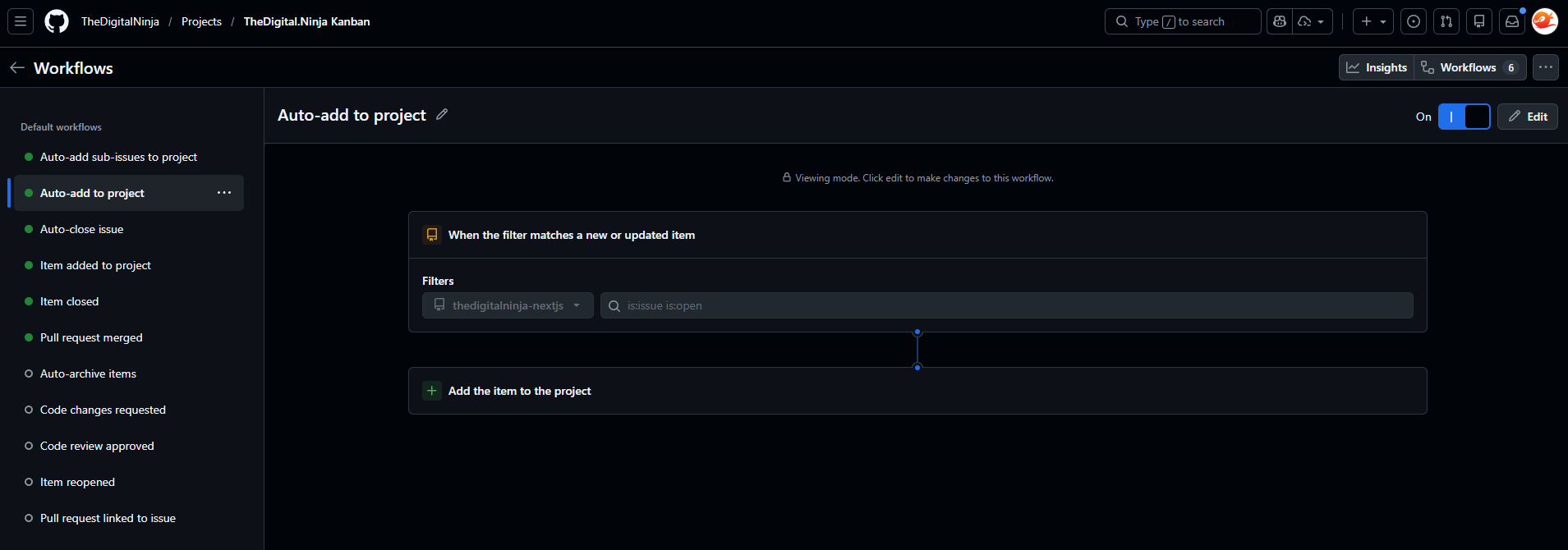
Now we have our basic repo and kanban board all set up and ready to go.
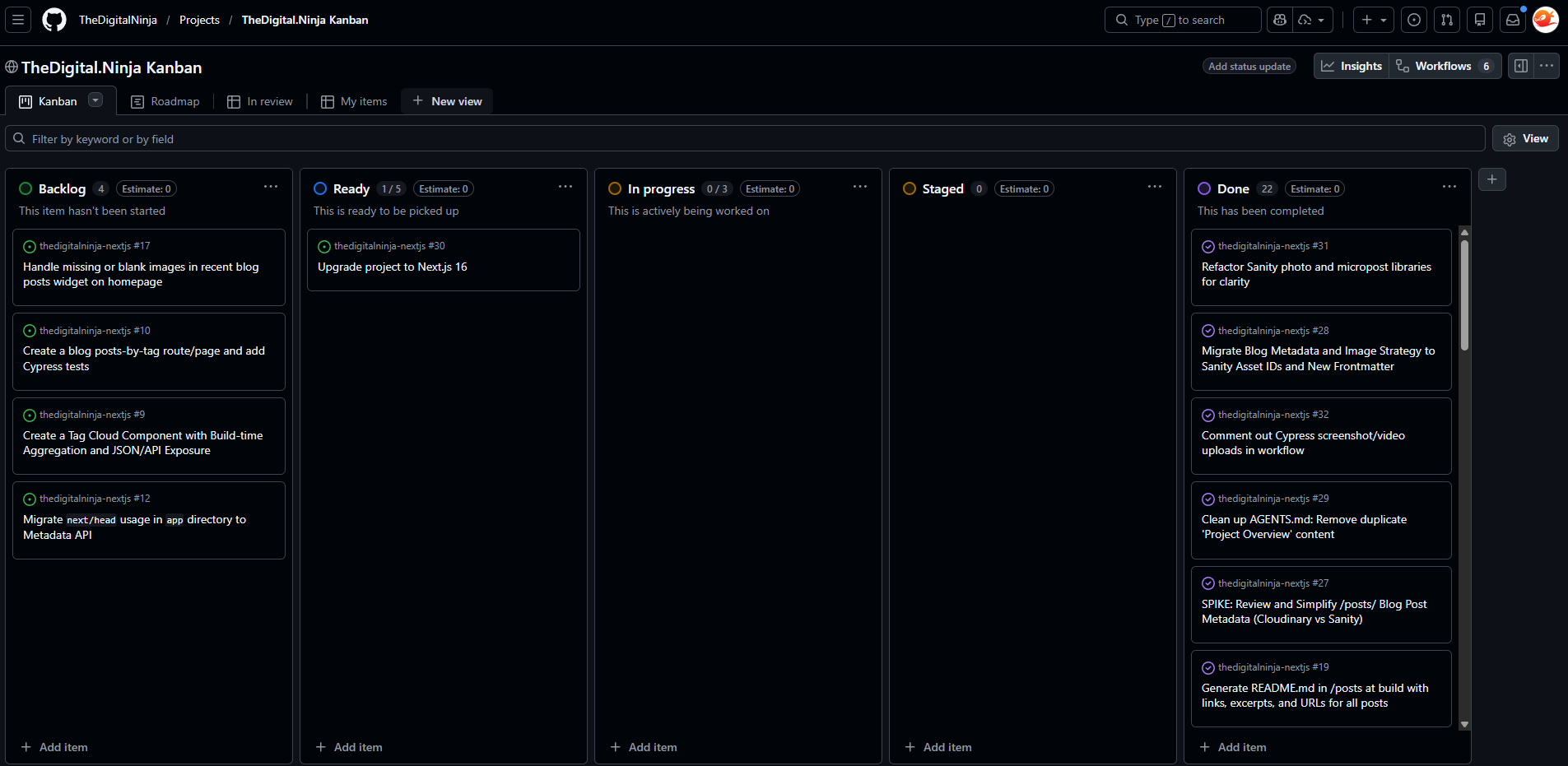
AGENTS.md
I would always suggest starting out with an AGENTS.md file even before your generic README.md file is created. (I mean who doesn’t know how to npm install or pip install -r requirements.txt these days). I’m happy the industry is standardizing around the AGENTS.md file but if you must you can use your CLAUDE.md file or the deprecated cursor rules, copilot workflows etc. But I personally have moved to AGENTS.md and would suggest you do as well (blog post about this coming soon).
Starting out we really only need a "ticket creation" section, though a "Project Overview" and "Key Files & Directories" certainly doesn't hurt, especially if you have an already existing and setup project. You can look over my AGENTS.MD file as an example but below is the key Ticket Creation part I use to get started.
## Ticket Creation:
Kanban Project URL: https://github.com/users/TheDigitalNinja/projects/3

* Use a short, imperative title (8-10 words)
* This is a solo project—don’t include meta lines like "let me know…" or questions aimed back at the user. Just state requirements and acceptance criteria.
* Do not specify copy or exact UI text unless I provide it.
* After drafting the issue, scan the repo and add a “Likely files to edit” section listing the main file paths/components involved (homepage recent posts \+ /blog index \+ data source), with a brief reason per path.
This is what I use for my personal projects and yours can definitely vary. The key part I would suggest is the last bullet telling our ticket creating agent to find what files are most likely to be related to the ticket.
Ticket Creation
Now we are ready for a key part of agentic development, creating detailed tickets before we even think about touching code. I like taking my time to thoroughly create tickets as it gives me time to think about the architecture, libraries and coding patterns to be used. This is often referred to as “Spec Driven Development” and this step can’t be emphasized enough as it’s going to be the difference between a proper one shot and total spaghetti code. It also gives us humans a chance to stay in one headspace thinking about what, how, and with what, we are going to build, before we get into the weeds of the code.
Tickets to Code
Now we have all the ingredients to get started and really start building. My tool of choice is Cursor. This allows me to keep my VSCode AI free for my clients and all my AI work contained in its own IDE. I also really like the new agent mode introduced in Cursor 2.0 but of course you can use whatever tools you would like such as claude code or gpt codex, this is just how I build stuff.
We will slide the card in github from todo to in progress and then just copy and paste the contents of it into a new agent/chat session. The first ticket should be general project setup and include a section on updating the AGENTS.md file with the project folder structure, key technologies, testing frameworks, and the likes.
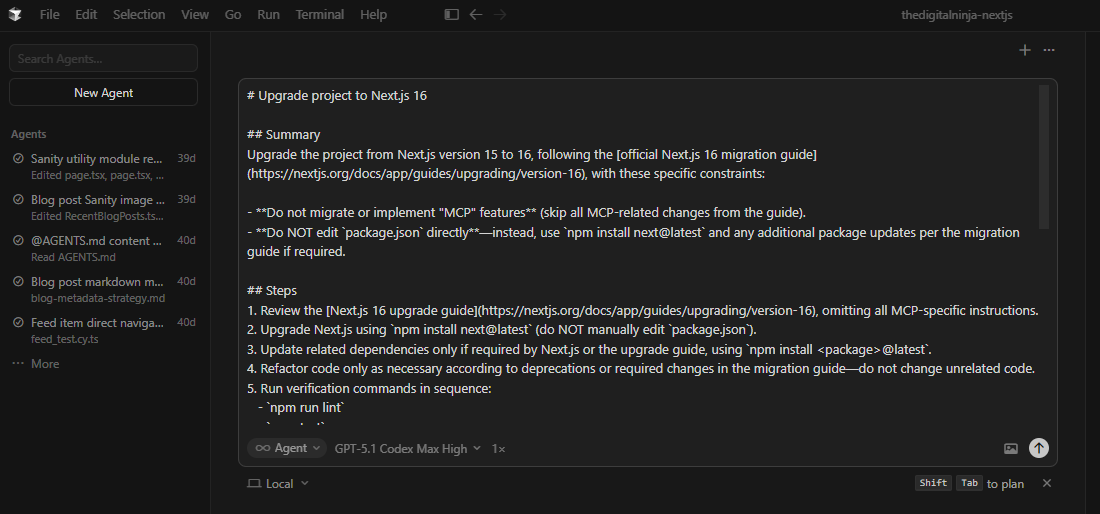
Let the agent work its magic and once it's done we review the code carefully. The main thing I look for is incorrect assumptions. Correct assumptions are basically the magic so I want to find any incorrect ones early on and adjust my AGENTS.md file accordingly. Sometimes I even like to load up as much context as I can and specifically ask the AI to give me as many assumptions as it can, not to just repeat what it knows, but to make assumptions. That helps me clarify anything it might not quite understand before it even becomes a problem.
Once the work is complete we can commit it back to github and start the commit message with the Github issue ID so they link together nicely. It helps make the repo look professional but more importantly it helps remember the why when we go back at a much later date and look over the code we have long since forgotten about.
Rinse and repeat this app and you got yourself a stew app baby.
Conclusion
Nothing super special here but it's my foundation for breaking up application design/architecture and then rapidly building it out and I think it's pretty solid. Many of you may be saying that it's not truly agentic since I bring it into my IDE instead of just assigning the ticket to an agent, and that's not untrue. But one of the main goals for my personal projects is to be close to the AI models so I can better understand them as they evolve so I prefer to be up close and personal within my IDE. Also, as of the time of this writing, CoPilot in Github sucks.

Russell Perkins
Engineer, Father, Foodie, Traveler
I'm Russell Perkins, a Principal Technical Consultant and Solutions Architect with a passion for all things tech. Feel free to dive into my blog posts for insights on software architecture, AI, my life, books, travel, and the latest in tech innovations.
Read more about RussellContinue Reading